
Automate an iron condor or 0DTE spread from an alert
Turn a TradingView alert into a 4-leg iron condor or a same-day spread at Schwab, Tradier, tastytrade or Alpaca, sized by your budget per entry.
Watch the setup
0:36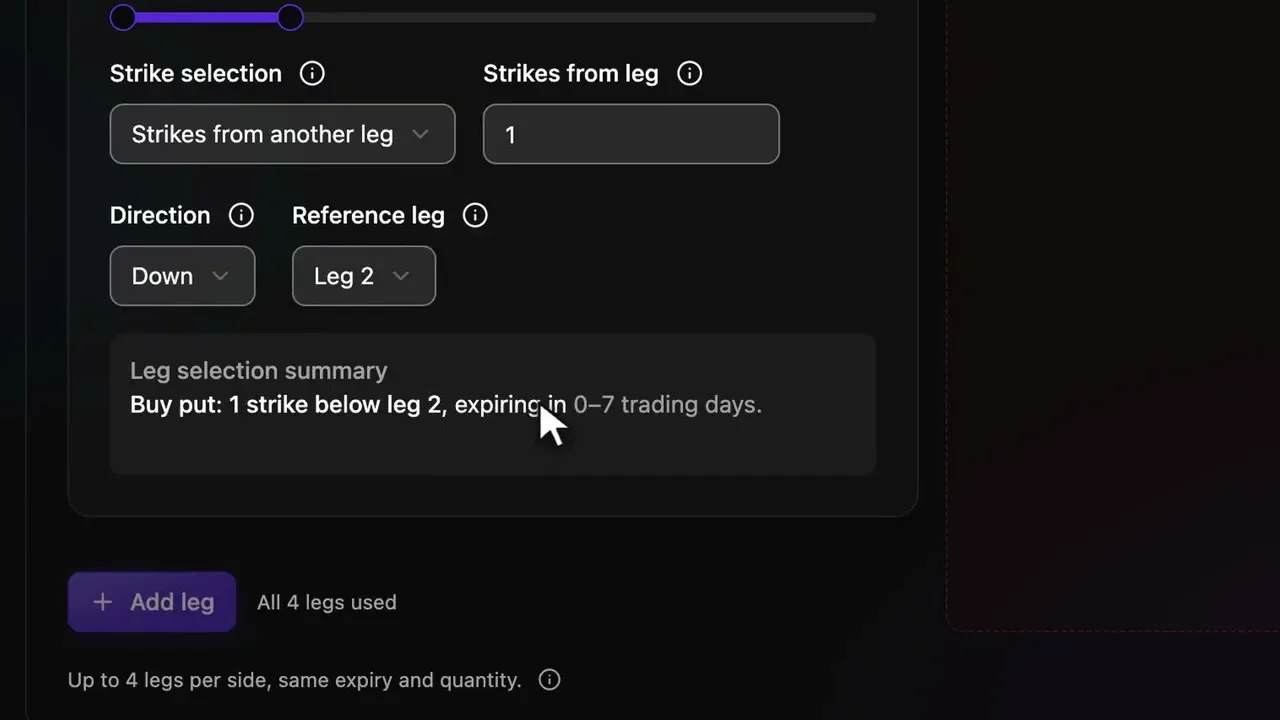
To automate an iron condor or a 0DTE spread, create an options strategy that picks contracts From my rules, set each leg and a days-to-expiry range, check the alert format, then deploy a bot on a broker account. One entry alert then opens every leg as a single order, and an exit alert closes them.
A spread has defined risk only when every leg fills. If your broker rejects a protective long leg, you can be left with a naked short.
Order rules
- A strategy places 1 to 4 legs per order, on one expiration, with the same quantity on every leg.
- Legs picked by your rules expire 0 to 31 trading days out.
- A Discord or Telegram alert with no expiry takes the nearest listed one, 0DTE included.
- Orders are market or limit. A spread limit is a net debit or credit.
- Exits come from exit alerts. Nyria places no stop orders.
- Your budget per entry sets the size, never the alert.
Steps
Create the strategy
In Nyria, select Create strategy, name it and keep TradingView as the alert source. Select Next, set Asset type to Options and Contract selection to From my rules.
Set the legs
In Option legs, add each leg. An iron condor uses all four:
Leg 1: Sell, Put,  0.20 delta,        0-7 DTE
Leg 2: Buy,  Put,  Strikes from another leg: 5 Down from Leg 1
Leg 3: Sell, Call, 0.20 delta,        same DTE as Leg 1
Leg 4: Buy,  Call, Strikes from another leg: 5 Up from Leg 3
For a 0DTE spread, set the days-to-expiry range to 0 to 0. Nyria then opens contracts that expire today.
Choose the order type
Pick market or limit for the entry and the exit. For a spread, the bid, ask and mid targets use the spread's combined price, not one leg's.
Check the alert format
Paste an example entry alert and an exit alert, then select Check and save. Nyria finds a contract for every leg in the option chain and places no order. If a leg fails, widen the range or shrink an offset.
Deploy a bot
Select Deploy bot, set Budget per entry and pick the broker account. Each spread counts against the budget, and the bot opens as many whole spreads as fit.
Brokers for multi-leg options
| Broker | Legs per order |
|---|---|
| Charles Schwab | 4 |
| Tradier | 4 |
| tastytrade | 4 |
| Alpaca | 4 |
Nyria Paper takes the same multi-leg orders for free, while the options market is open. Each broker's page has its own order types and approval notes: Schwab, Tradier, tastytrade and Alpaca.
Exits and expiry
Nyria doesn't close an iron condor on its own. Without an exit alert, the bot holds through expiration, and the broker assigns anything in the money. For a 0DTE spread, send the exit before the last half hour of the session. What happens to an option that expires today shows what Nyria logs.
Questions
Can Nyria trade an iron condor from an alert?
Yes. A strategy takes up to 4 legs on one expiration, and an iron condor uses all four. One entry alert opens the whole condor as a single order.
Can Nyria trade 0DTE spreads?
Yes. Set the days-to-expiry range to 0 to 0 and Nyria opens contracts that expire today. The entry fails when no listed expiration fits the range.
Which brokers take multi-leg options?
Charles Schwab, Tradier, tastytrade and Alpaca take up to 4 legs per order. Nyria Paper takes them too.
Does the alert set the size?
No. Your budget per entry sets the size, and the bot opens as many whole spreads as fit.
Which structures can't Nyria build?
A strategy can't hold more than 4 legs, or legs on two expirations. Calendars and diagonals can't be built.
What does it cost?
Paper is free. Live trading from $15 a month, priced by your total entry allocation.
Related
- Multi-leg options strategies: verticals and the full leg builder.
- What happens to an option that expires today?
- Trading behavior: how entry and exit alerts work.
- Webhook reference: every field Nyria accepts.