
Post trades to a Discord server you run
Nyria posts each entry and exit your strategy makes to a channel in a Discord server you run, with the order in a code block and P&L if you choose.
For strategy owners, usually creators who sell access: Nyria posts the strategy's trades for your members, so you don't post screenshots by hand. It works with any alert source. To read alerts from Discord instead, see Discord alerts.
What it looks like
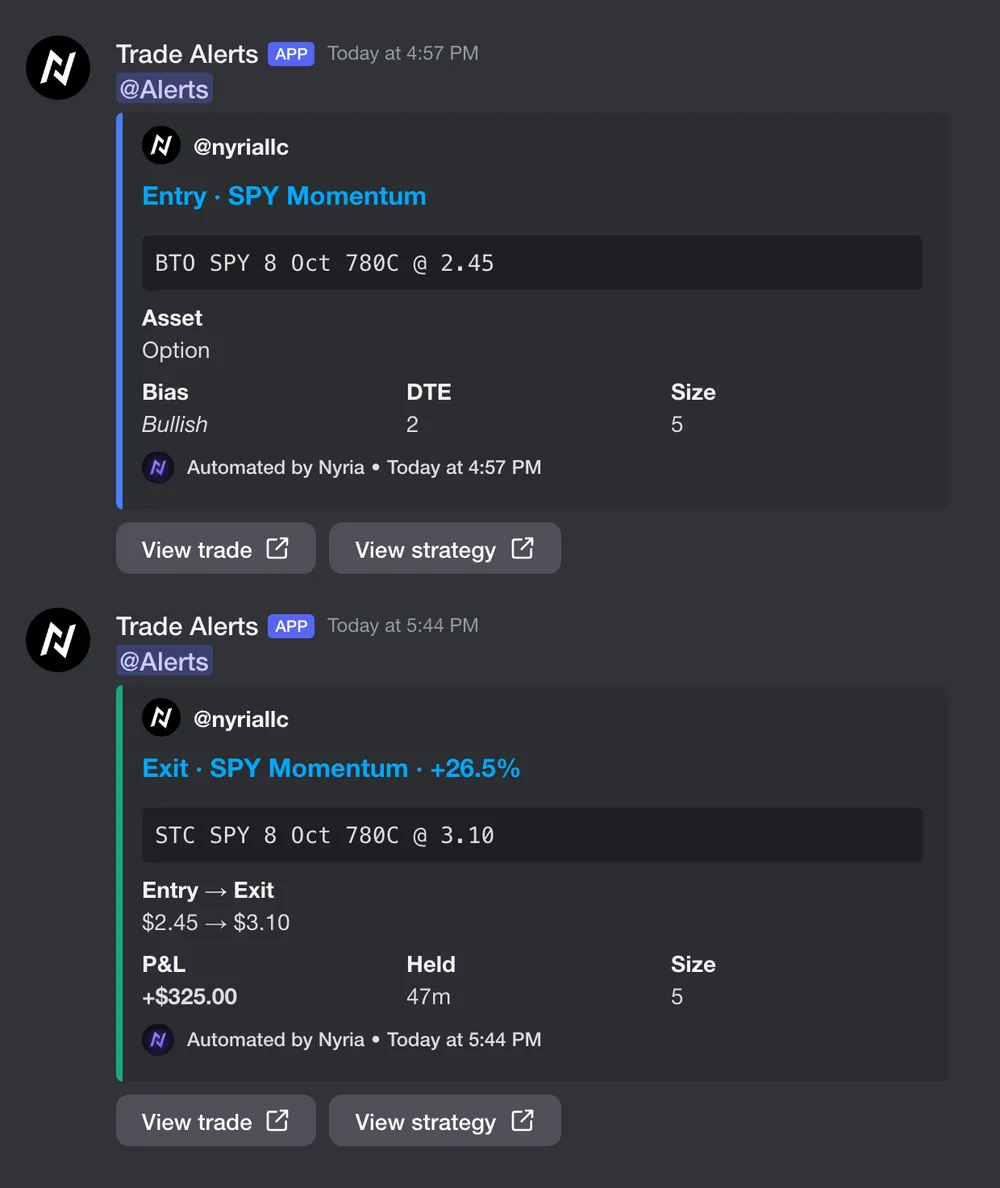
A trade posts when it opens and again when it closes. Each post is headed by your handle and profile picture, linked to your Nyria profile.
- The title says Entry or Exit, then the strategy, and on an exit the result, like Exit · Momo · +2.0%.
- The order comes first, in a code block, the way traders write it:
BTO SPY 20 Nov 780C @ 10.25for an option, one line per leg for a spread,Opened NVDA long @ 215.07for a stock or a coin. - Entries are blue and name the asset. An option adds its bias and days to expiry, a spread its net credit or debit, a perpetual its leverage.
- Exits are green when the trade made money, red when it lost, and grey when it closed flat or shows no P&L. They add entry → exit, the P&L from your own fills, and how long the position was held.
- View trade and View strategy buttons open the trade and your public strategy page.
- A paper fill is marked
[PAPER]in the title and says so in the footer.
Step 1: Create a webhook in a Discord server you run
In Discord, open Server Settings → Integrations → Webhooks → New Webhook. Pick the channel the trades should appear in, then Copy Webhook URL.
Treat that URL like a password: anyone who has it can post to that channel as your webhook. Keep it out of public channels, support tickets and screen shares. If it leaks, delete the webhook in Discord and create a new one, and the old URL stops working at once.
Step 2: Paste it into your strategy
Open your strategy → Integration tab → Post trades to my Discord. The card only appears for the strategy owner.
Paste the URL and select Save. The field stays masked after saving: use the
eye icon to check it. Nyria accepts only Discord webhook URLs
(discord.com/api/webhooks/…).
Step 3: Choose what your community sees
| Setting | What it does | Suggested for a public channel |
|---|---|---|
| Post entries | Post when a position opens | On |
| Post exits | Post when a position closes | On |
| Show size | Include quantity filled | Off (position size is usually private) |
| Show P&L on exits | Include the P&L on each close | Your call (see the note below) |
| Ping a role | Mention one role on every post | Off unless members asked for it |
P&L in a public channel is a performance claim. Leave losing posts up and tell your members that past results don't predict future ones. If in doubt, leave P&L off: members see their own results in their own accounts.
Only a role you name is pinged.
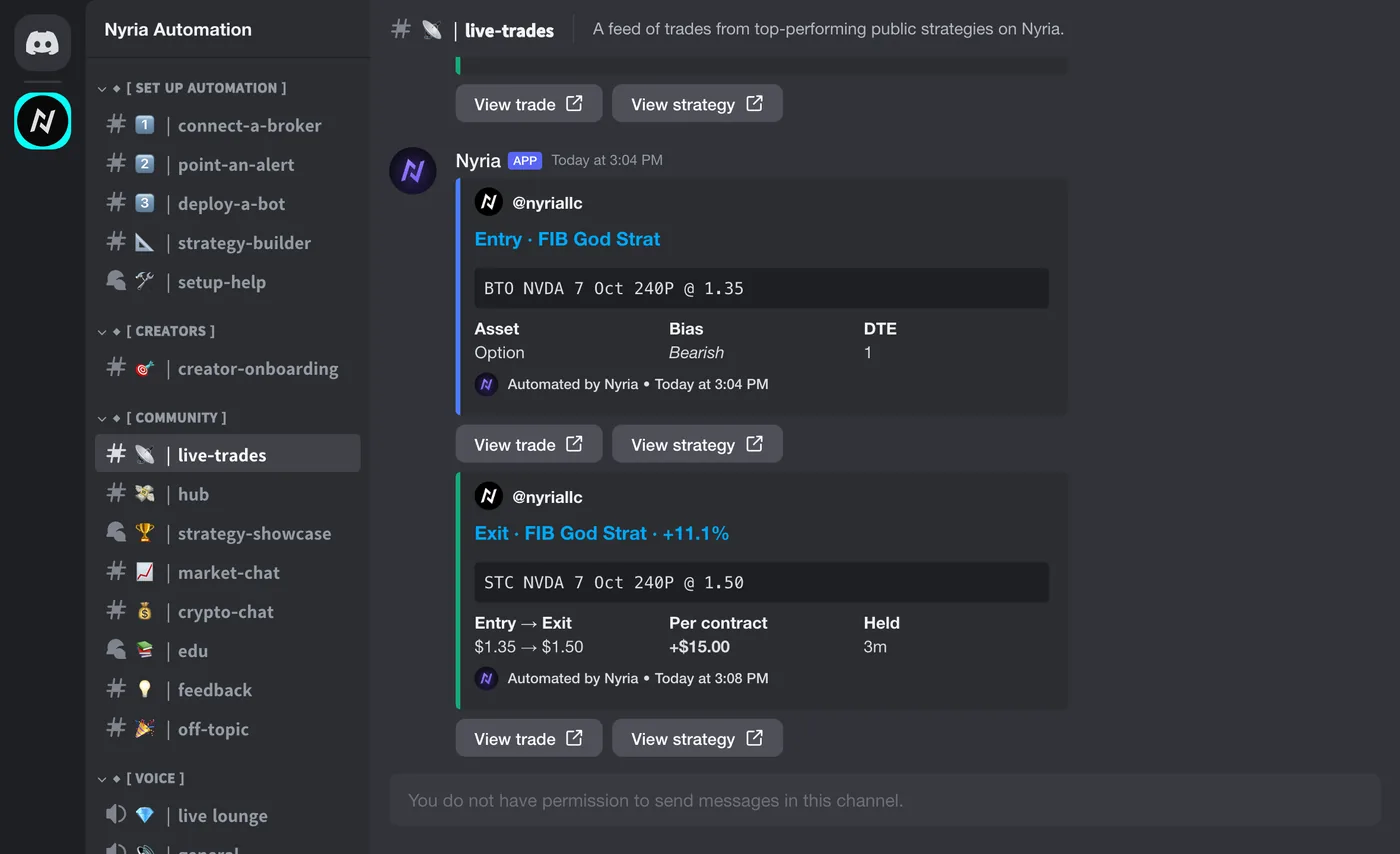
Nyria's #live-trades is separate. A public or premium strategy can post
its alerts there too, in the same format, from the Sharing section of its
Integration tab, after a delay you choose. A private strategy can't. Those posts never show a size:
a close shows the percentage and the move on one unit (one share, one contract
or one spread). A crypto close shows the percentage and the move on the
strategy's recommended amount per entry, like +$0.28 per $100 entry, or the
percentage alone when the strategy sets no amount. It never pings anyone in
Nyria's server.
Step 4: Send a sample
Select Send sample. Nyria posts one embed with example figures, marked Sample alert in the footer, so you can check the channel, the format and the role ping before a real trade posts.
If you changed a setting, save first. The sample uses the saved settings.
How it behaves
Posting never delays or blocks an order. A slow, broken or deleted webhook only affects the post.
Posts show within about a minute of a fill, after your members' bots have acted.
Nothing is posted twice. If Discord is down when a trade posts, that embed is skipped, not replayed. If Discord asks Nyria to slow down, the post waits and then goes out.
Turning it off: clear the webhook field and save. Posting stops at once, with nothing queued.
Common questions
Will it post my whole trade history when I turn it on? No. Nothing older than 24 hours is ever posted.
Can I send different strategies to different channels? Yes. The webhook is per strategy, so point each one wherever you like.
Can my members' own trades post to my server? No. Only the strategy's own trades are posted. A copier's fills are private to them and never leave their account.
Does this cost anything? No. It comes with every strategy you own.
Related
- Discord as an alert source: reading alerts into Nyria
- Strategies: creating and publishing a strategy
- Risk disclosure: before publishing performance figures
- Why is my bot not trading?: the six usual reasons a bot places no order